Ecommerce
Magento to Shopify: how to migrate without losing rankings.
By Felix Grant5 min read
You keep your rankings in a Magento to Shopify migration by redirecting every old URL that earns traffic or links to its closest new page, keeping content and page titles at parity, and testing it all before the switch. The data move is the easier half. Magento URLs, layered navigation and custom extensions are where rankings and revenue usually get lost, so plan those first.
Timing
Why now, and how long you have
Adobe's lifecycle policy, checked in November 2026, sets the clock. Adobe Commerce 2.4.6 left standard support on 11 August 2026, with extended support to 31 August 2027 and security fixes only to 31 May 2028. Version 2.4.7 reaches the end of standard support on 31 May 2027, with extended support to 31 May 2028. Version 2.4.8 runs to 31 May 2028. Versions 2.4.4 and 2.4.5 are already past extended support, on a security-only period that ends on 31 May 2027.
Magento Open Source follows the same release line, but without an Adobe support contract, so patching depends entirely on your developer. If you are still on Magento 1, it has had no official support since June 2020.
So the real choice for most UK shops on older versions is a Magento upgrade, which is a project in its own right, or a move. Give a migration at least three to four months for a mid-sized catalogue, and plan the launch away from peak trading, which rules out most of October to December for many retailers.
Budget honestly as well. A Magento upgrade across several minor versions often means updating or replacing extensions, retesting the theme and fixing integrations, so compare its full cost with a migration before deciding the move is the expensive option.
Data
Mapping Magento data to Shopify
Magento's data model is more flexible than Shopify's, so plan the mapping before anyone exports anything. Configurable products become Shopify products with variants. Shopify now allows up to 2,048 variants per product, but still across three options, so a product with four or five attributes needs rethinking. Custom attributes become metafields, and attribute sets become product types or templates.
Customers move with names, addresses, order history and marketing consent status. Passwords do not move, because Shopify cannot read Magento's password hashes, so plan the account activation email and its timing. Customer groups usually become tags or B2B companies. Gift card balances, store credit and live discount rules need moving exactly, and CMS pages and blocks need rebuilding as pages and sections rather than copying markup.
Check the totals after every import: products, variants, customers, orders and gift card balances should match the Magento source. Then spot check at least 20 products across categories by hand, including prices, variants, images and stock.
Redirects
Redirects, the part that protects rankings
Almost every Magento URL changes. Magento often uses .html suffixes, category paths inside product URLs, and sometimes store codes. Shopify uses fixed patterns: products under /products/, categories under /collections/, content under /pages/ and /blogs/.
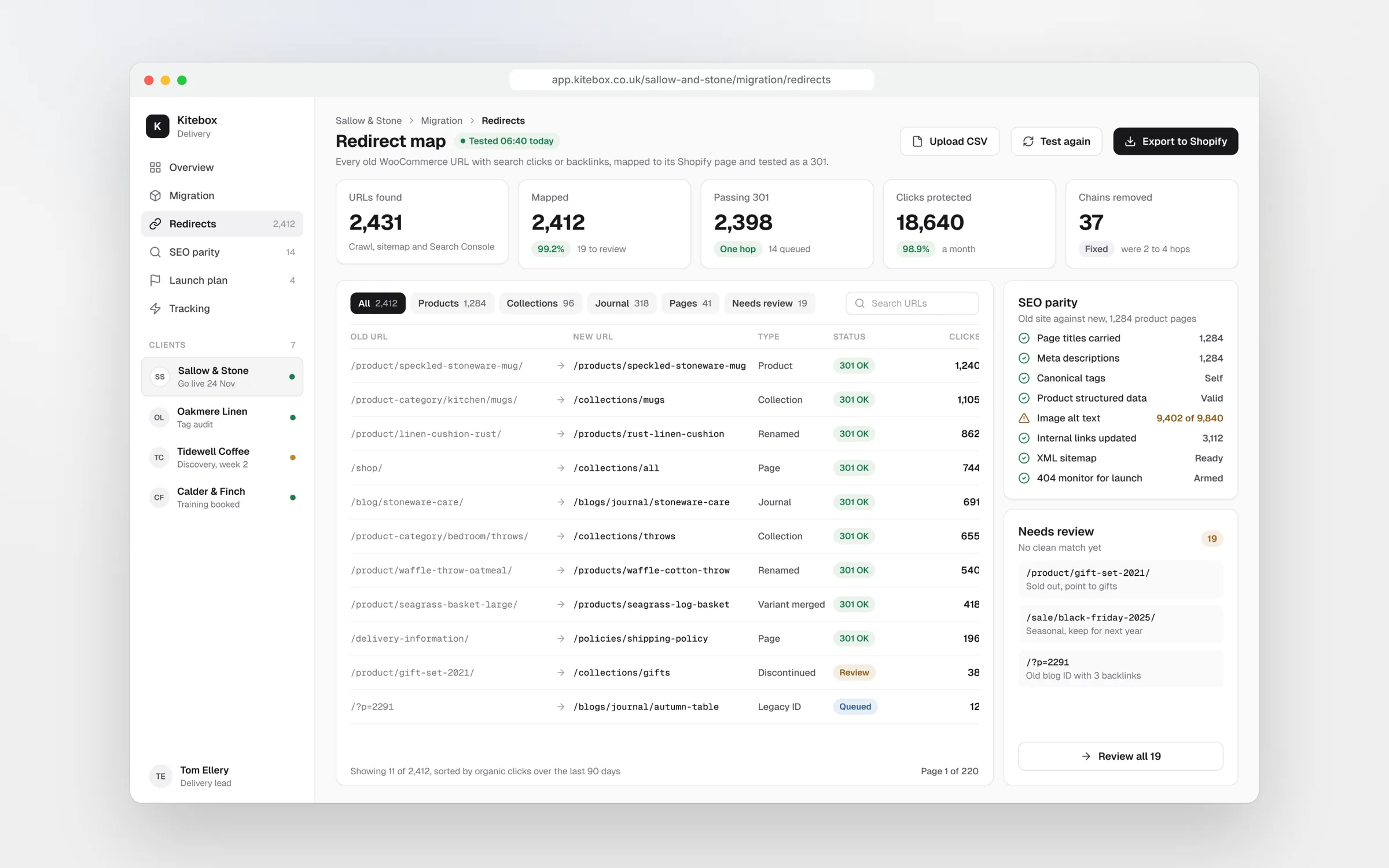
Build the redirect map from three sources: a full crawl of the live site, Magento's URL rewrite table, and the pages with traffic or backlinks from Search Console and your link data. Redirect each old URL to its closest new one, product to product and category to collection. Do not send everything to the home page. Google treats that as a soft 404 and the old page's value is lost.
Layered navigation needs its own decision. Magento filter URLs with traffic or links should be redirected to a matching collection or filtered collection; the rest can go to their parent collection. Shopify redirects only fire when nothing exists at the old path on the new store, so test a sample of redirects on the staging store before switch-over, and keep titles, headings, copy and structured data on high-traffic pages the same at launch. Change one thing at a time.
Map every URL that earns traffic or links. Then test it before DNS moves.
Extensions
Extensions versus apps
A Magento store collects extensions over the years. List every one, what it does and who still uses it. You will usually find three groups: features Shopify now does natively, features a well-supported app covers, and custom logic written for your business.
Do not replace extensions one for one. Each app adds a monthly fee and some front-end weight, so start with what the business needs, not what the old store had. Custom pricing, shipping and checkout rules usually move to Shopify Functions or a custom app, and some only work on Plus.
Integrations need the same care. Write down which system owns stock, prices, orders and customers, how often each syncs, and what happens when a sync fails. An ERP or warehouse connection that worked through a Magento module will need a new connector, and it should be tested with real order volumes before launch.
B2B
Moving B2B from Magento
Adobe Commerce B2B has company accounts, shared catalogues, quotes and requisition lists. Shopify B2B covers company accounts, locations, catalogues with their own prices, payment terms and quantity rules. Standard plans include up to three B2B catalogues and Plus has unlimited, so a business with many trade price lists usually needs Plus.
Quote requests and requisition lists are not native in the same way, so decide whether your trade customers really use them, and if they do, choose an app or build. Move company records, buyers and their price lists as part of the data plan, and test a full trade order through to invoicing in your accounts or ERP.
Check trade pricing carefully at launch. Log in as a sample of real trade buyers on the staging store and confirm each sees the right catalogue, prices, tax display and payment terms. Trade customers notice a wrong price faster than anyone, and a mistake there costs margin as well as goodwill.
Launch
Launch and the first month
Take a baseline before anything changes: 12 months of organic traffic by page, top queries from Search Console and revenue by channel. On launch day, run the final data sync, switch DNS, remove the staging block, test ten priority redirects and place a real order, then submit the new sitemap.
For the first weeks, check Search Console daily for 404s and add redirects for any old URL still getting visits. Rebuild GA4 and ad tracking for the new checkout and reconcile the first week of orders against payment settlements. Some movement in rankings is normal for a few weeks; a steady fall on key pages is not.
Our Magento to Shopify migrations start from £6,000. Most begin with a £1,950 migration audit that produces the redirect map and a costed plan, credited against the build.
Key takeaways
- Adobe Commerce 2.4.6 left standard support in August 2026 and 2.4.7 follows in May 2027
- Map Magento attributes, customer groups and passwords before exporting anything
- Redirect every URL with traffic or links to its closest Shopify page, never the home page
- Replace extensions by business need, not one app for each old module
- Shopify B2B covers most trade needs, with unlimited catalogues on Plus

Written by
Felix Grant
Founder of Kitebox, a business technology and AI consultancy that builds what it recommends. Based in Mallorca, working with UK businesses.
About Felix →